
Track business mileage for HMRC
Pro AI
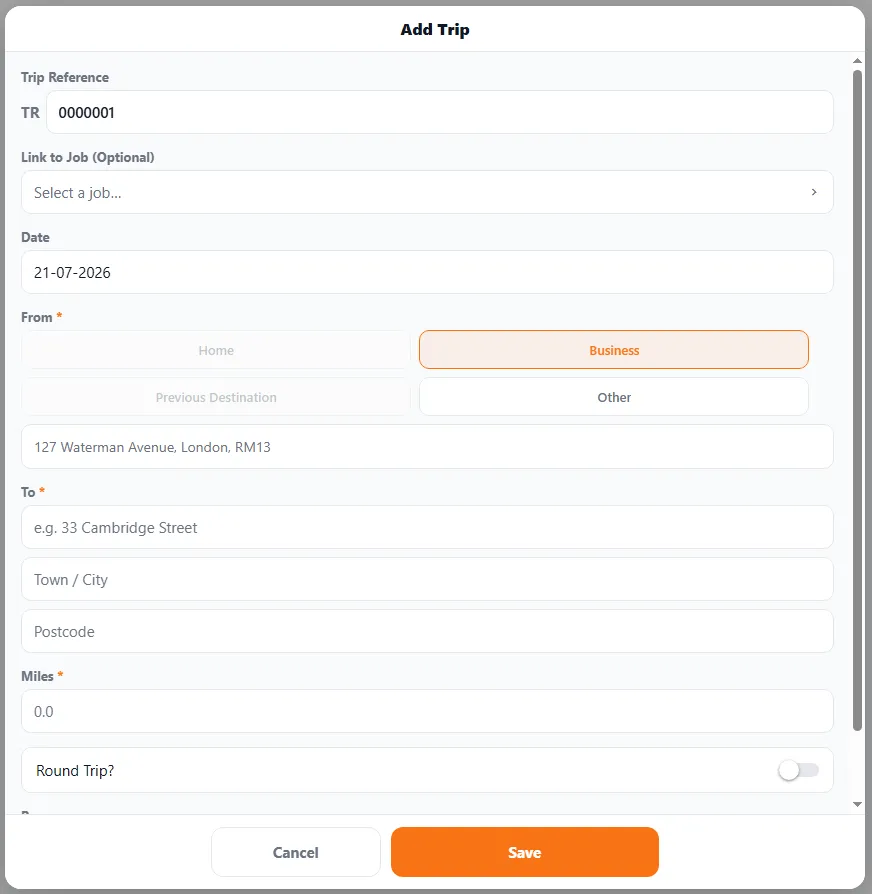
The Add Trip form — set your start and end, the miles, and whether it’s a round trip.
The miles you drive for work are a legitimate tax deduction — but only with records to back them up. BizzyDay’s mileage log keeps them for you, the way HMRC wants.
Why log mileage
Section titled “Why log mileage”- Claim it back. HMRC lets you claim an approved rate per business mile — that adds up fast over a year.
- Keep proper records. To claim, you need a log of the journeys: date, route and distance.
- Stay honest and audit-ready. A running log is far safer than guessing a figure at year-end.
Logging a trip
Section titled “Logging a trip”- Open Mileage and add a trip (it gets its own TR reference).
- Optionally link it to a job, and set the date.
- Set the From — pick Home, Business, your Previous Destination or Other, then the To address.
- Enter the miles (BizzyDay helps with the distance so you’re not guessing), and flag it as a round trip if you drove back.
- Save — it’s added to your log and your finances.
Works with your jobs and routes
Section titled “Works with your jobs and routes”Because your jobs have addresses, mileage ties naturally to the work you did. And if you use the route optimiser to plan an efficient day, the miles you actually drive can be captured here — so you save fuel and keep the tax record.
Set miles or kilometres in Settings — most UK tradespeople use miles, in line with HMRC’s per-mile rates.