
How to issue a credit note
Sometimes an invoice needs to be reduced or reversed — a price was wrong, a customer was overcharged, or part of a job was refunded. The correct, tidy way to do that is a credit note, not deleting or editing the original invoice.
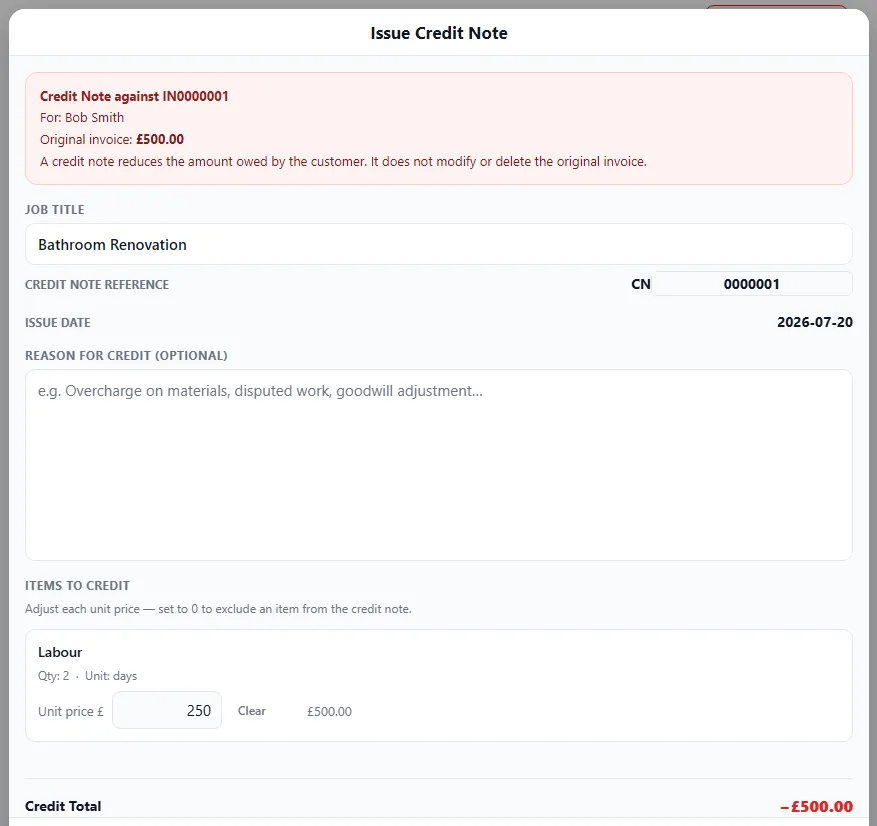
What a credit note is
Section titled “What a credit note is”A credit note records that you owe the customer some amount back against an invoice — effectively “cancelling” part or all of it. It leaves the original invoice intact and adds a proper, traceable correction.
Why not just edit or delete the invoice?
Section titled “Why not just edit or delete the invoice?”- Invoice numbers should run in an unbroken sequence — deleting one leaves a gap that looks wrong to HMRC.
- Editing a sent invoice means your copy and the customer’s no longer match.
- A credit note keeps a clean audit trail: here’s what was charged, here’s what was credited, here’s why.
Creating a credit note
Section titled “Creating a credit note”- Find the invoice that needs correcting and raise a credit note against it.
- The credit note gets its own CN-prefixed reference, so it’s easy to track.
- Add an optional reason (e.g. overcharge on materials, disputed work, goodwill adjustment).
- Adjust the items to credit — set each item’s unit price to what you’re crediting back, or set it to 0 to leave that item out. The credit total updates automatically.
- Save and share it with the customer, just like an invoice.
When to use one
Section titled “When to use one”- You overcharged on an invoice already sent.
- You’re refunding part of a job.
- A price or line item was wrong after the invoice went out.
- You’re giving a goodwill discount after invoicing.