Skip to content

Brand your quotes & invoices

Pro AI

Your quotes and invoices are seen by every customer — they’re marketing as much as paperwork. Document styles let you brand them so they look unmistakably yours.

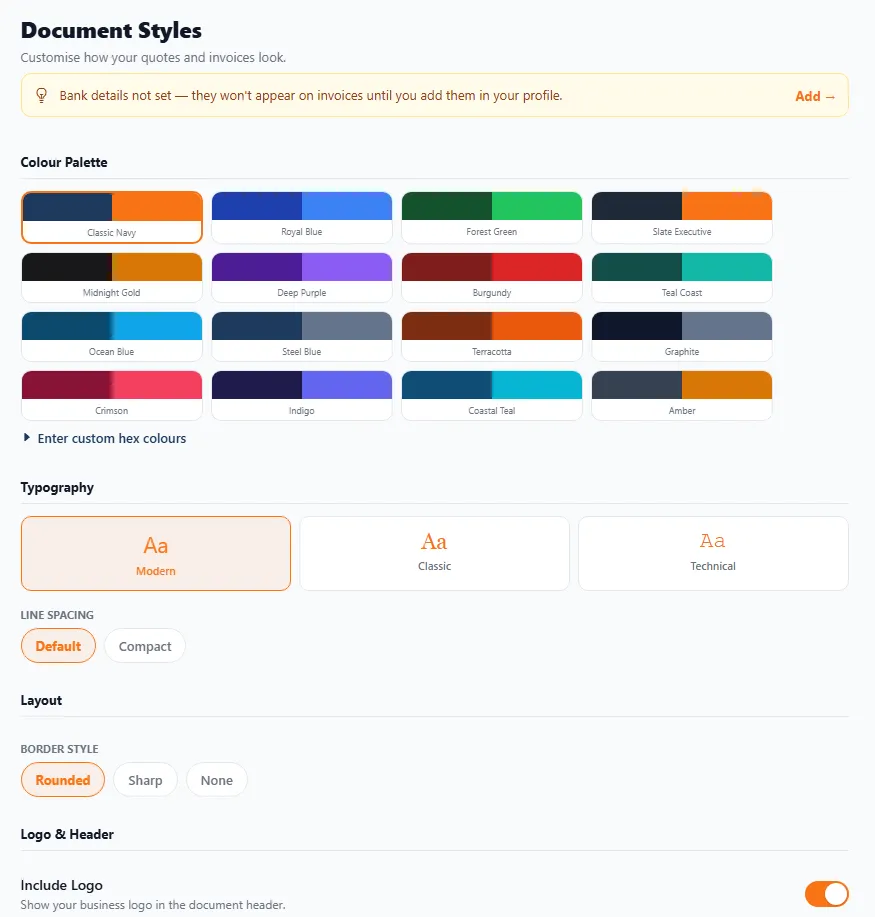
The Document Styles screen: a colour palette of named presets (Classic Navy, Royal Blue, Forest Green and many more) plus custom hex colours, typography options (Modern, Classic, Technical), line spacing, a border style (Rounded, Sharp, None) and an Include Logo toggle.
Document Styles — choose a colour palette, typeface, spacing, border style and logo.
  • Colour palette — pick from named presets (Classic Navy, Royal Blue, Forest Green, Burgundy, Terracotta and many more), or enter your own custom hex colours to match your van, website and BizzyDay profile.
  • Typography — choose a Modern, Classic or Technical typeface, and Default or Compact line spacing.
  • Layout — a Rounded, Sharp or None border style.
  • Logo & header — turn Include Logo on to show your business logo in the document header.
  • Trust. A polished, branded invoice looks like it came from an established business.
  • Recognition. Consistent colours and logo across quotes and invoices make you memorable.
  • Prompt payment. Customers take a professional-looking invoice more seriously.
  1. Open Document Styles.
  2. Choose a colour palette (or enter custom hex colours).
  3. Pick your typography and line spacing.
  4. Set the border style and turn Include Logo on.
  5. It applies to new quotes and invoices.