
Set up your tradesperson profile
Your public profile is what customers see when they find you on BizzyDay. A complete, accurate profile is the single biggest thing you can do to win work — it’s your shop window.
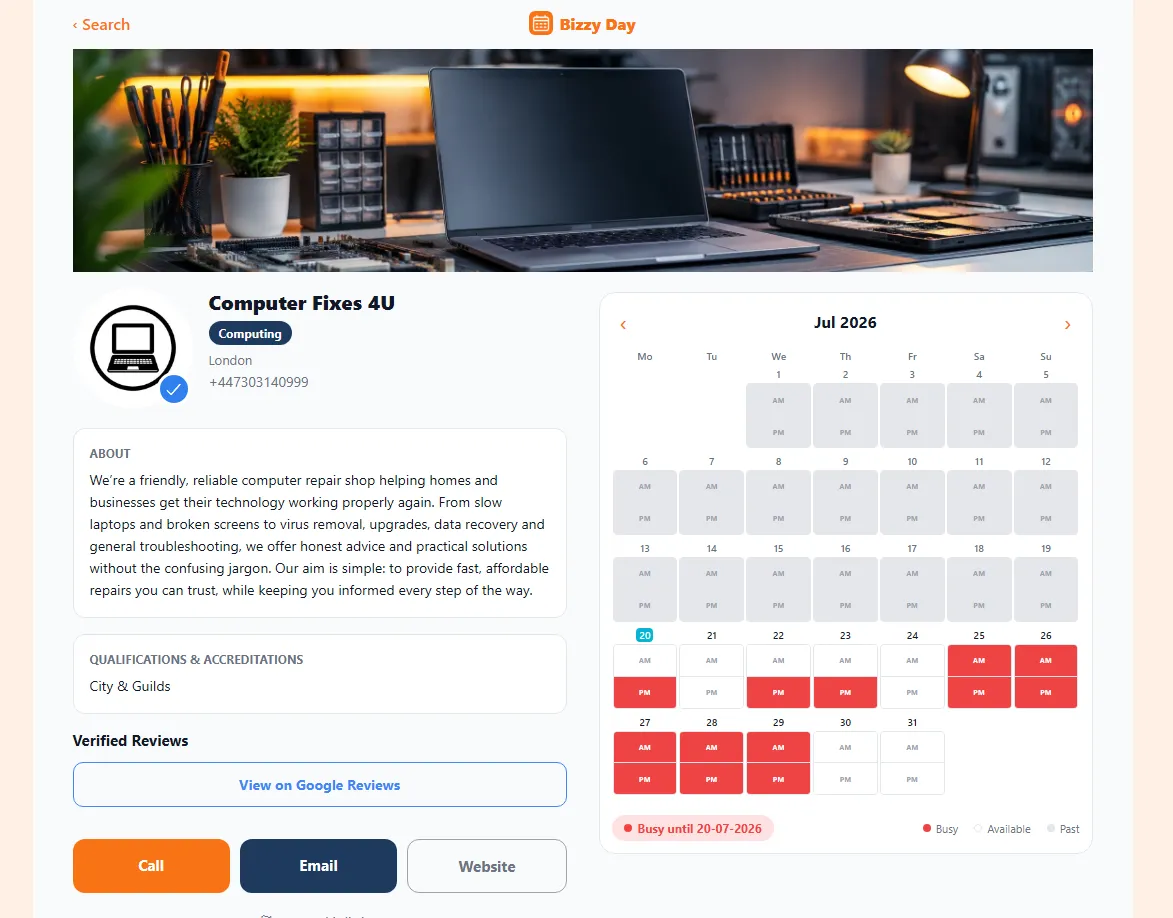
What customers see
Section titled “What customers see”- Your business name.
- The trade(s) you offer.
- Your location and how far you’ll travel.
- Your live availability calendar.
- A blue verified tick, if you’re verified.
- A link to your verified reviews (Google Reviews, Checkatrade or Trustatrader).
- How to contact you.
Setting it up
Section titled “Setting it up”- Go to My Profile in your dashboard.
- Add your business name exactly as you want it shown.
- Select your trades — add every trade you genuinely offer so you appear in more searches.
- Set your base location (postcode) and how far you’re willing to travel.
- Add your contact details.
- Add your review link (Google Reviews, Checkatrade or Trustatrader) if you have one.
- Save — your profile is now live for customers to find.
Tips for a profile that wins work
Section titled “Tips for a profile that wins work”- List all your trades. Each one is a search you could show up in. A plumber who also does bathrooms should list both.
- Be realistic about travel distance. Too small and you miss jobs; too big and you get enquiries you can’t take.
- Add your review link. Independent reviews (Google Reviews, Checkatrade or Trustatrader) are powerful trust signals — see Making the most of reviews.
- Get verified. The blue tick reassures customers you’re genuine.
- Keep your availability current. A live, accurate calendar is the whole reason customers choose BizzyDay.
Keeping it up to date
Section titled “Keeping it up to date”Your profile isn’t “set and forget.” Whenever your trades, area or contact details change, update them here. And keep that calendar accurate — it’s the part customers rely on most.