
How to create and send invoices
An invoice is how you ask to be paid for work you’ve done — and how you keep the records HMRC expects. BizzyDay makes creating, sending and tracking invoices quick, professional and tidy. This guide covers both the why and the how.
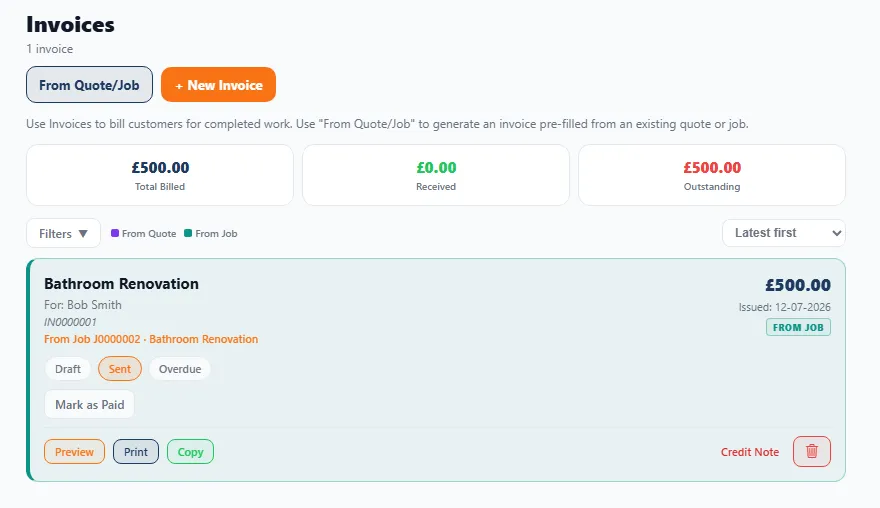
Why businesses use invoices
Section titled “Why businesses use invoices”An invoice is a formal request for payment that records exactly what was supplied, to whom, and for how much. Even for a sole trader, invoicing properly matters because it:
- Gets you paid. A clear, itemised invoice with your payment details leaves no excuse for delay.
- Creates a paper trail. Every job has a record both you and the customer can refer back to.
- Looks professional. A tidy, branded invoice signals you run a proper business — which makes customers more comfortable paying promptly.
- Keeps your books straight. Your invoices are the backbone of your income records at tax time.
The benefits of invoicing through BizzyDay
Section titled “The benefits of invoicing through BizzyDay”Doing it in BizzyDay (rather than a handwritten pad or a word processor) means:
- No re-typing. A job or quote becomes an invoice with the details already filled in.
- Correct numbering. Invoices are numbered in sequence automatically (important for HMRC).
- VAT handled for you if you’re registered.
- Payment tracking. See at a glance what’s paid, part-paid or overdue.
- It flows into your finances so your income picture is always current.
- Chasing built in. Overdue? Let AI debt chasing do the awkward follow-ups.
Invoices and tax
Section titled “Invoices and tax”Your invoices are central to your tax records. In the UK:
- Income records. As a self-employed person you must keep records of your business income — your invoices are those records. Keep them for at least the period HMRC requires.
- Sequential numbering. Invoice numbers should run in a logical, unbroken sequence so nothing looks missing. BizzyDay handles this for you.
- VAT. If you’re VAT registered, your invoices must meet extra requirements (see below). If you’re not, you must not charge VAT.
What an invoice needs to include
Section titled “What an invoice needs to include”A proper invoice should carry, at minimum:
- The word “Invoice” and a unique invoice number.
- Your business name, address and contact details.
- The customer’s name and address.
- The invoice date (and the supply/job date if different).
- A clear description of the work — itemised line by line.
- The amount due per line and the total.
- Your payment terms (when it’s due) and how to pay (bank details, etc.).
VAT — if you’re registered
Section titled “VAT — if you’re registered”If you’re VAT registered, your invoice must also show:
- Your VAT registration number.
- The VAT rate applied and the VAT amount.
- The total excluding VAT and the total including VAT.
Turn VAT on in Settings and BizzyDay applies it correctly on every invoice. Not registered? Leave it off and no VAT is shown.
How to create an invoice
Section titled “How to create an invoice”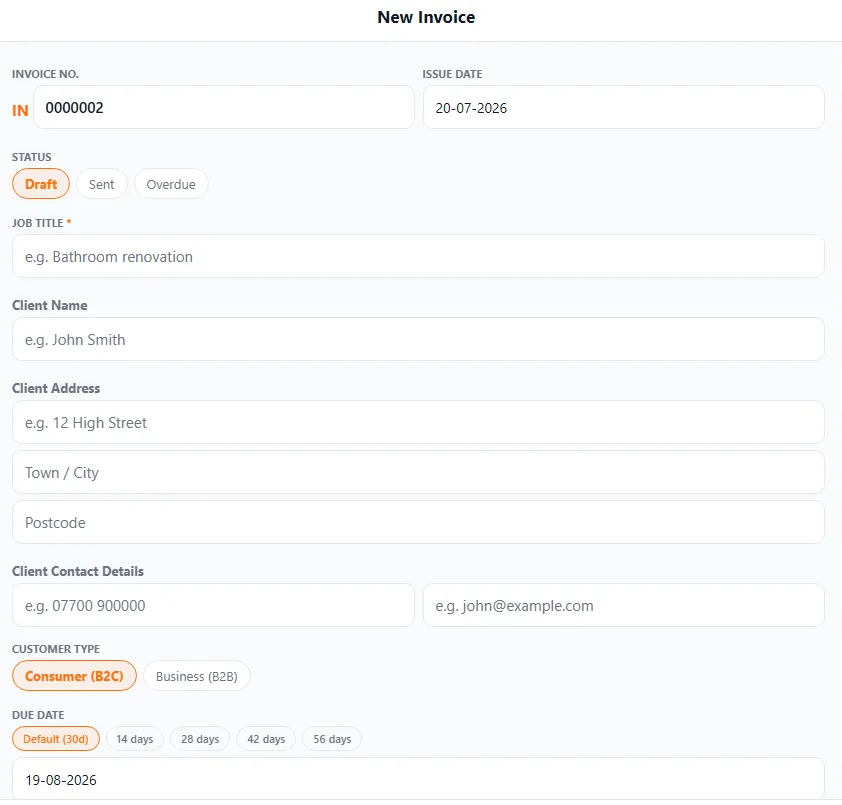
- Open Invoices and tap + New Invoice — or use From Quote/Job to raise it straight from a finished job or accepted quote so the details carry over.
- Check the customer details, and set whether they’re a Consumer (B2C) or Business (B2B).
- Add or review the line items — a description, quantity and price for each part of the work.
- Confirm VAT (if registered) and the total updates automatically.
- Set the payment terms — pick a due date of 14, 28, 42 or 56 days (or the 30-day default) and it’s worked out for you — plus your payment details.
- Save. Your invoice gets its unique IN-prefixed number automatically.
Line items
Section titled “Line items”Break the work into clear lines — labour, materials, call-out, and so on. Itemising helps the customer understand exactly what they’re paying for and heads off “what’s this for?” questions.
Deposits and instalments
Section titled “Deposits and instalments”For larger jobs you can invoice in stages — a deposit up front, the balance on completion — rather than one lump at the end. This helps your cash flow and is common for bigger work.
How to style an invoice
Section titled “How to style an invoice”Your invoice is a reflection of your business, so make it look the part. With document styles Pro AI you can:
- Add your logo and business colours.
- Choose a layout that suits your trade.
- Keep quotes and invoices consistently branded.
Even on Standard, your invoices are clean and professional out of the box — styling just lets you make them unmistakably yours. See Document styles.
How to print or share an invoice
Section titled “How to print or share an invoice”Once your invoice is ready you can:
- Share it as a PDF by message, email or WhatsApp.
- Print it for customers who prefer paper.
- Send a payment link / bank details so paying is easy.
The customer gets a professional PDF; you keep the record in BizzyDay.
Getting paid and tracking payment
Section titled “Getting paid and tracking payment”After you’ve sent it, BizzyDay helps you get the money in:
- Mark invoices paid (in full or part) as payment arrives.
- See what’s outstanding at a glance — paid, part-paid, due, overdue.
- Chase overdue invoices automatically with AI debt chasing, including polite reminders and, where appropriate, statutory late-payment interest.
- Need to correct or refund an invoice? Issue a credit note.
The full flow
Section titled “The full flow”Invoices don’t sit on their own — they’re one step in how work moves through BizzyDay:
Quote → Job → Invoice → Finances
Because each step carries the details forward, invoicing is usually just a case of checking and sending.