
Managing your subscription
Your Subscription screen is where you manage what you pay for. It shows your current plan, the price, and options to change it.
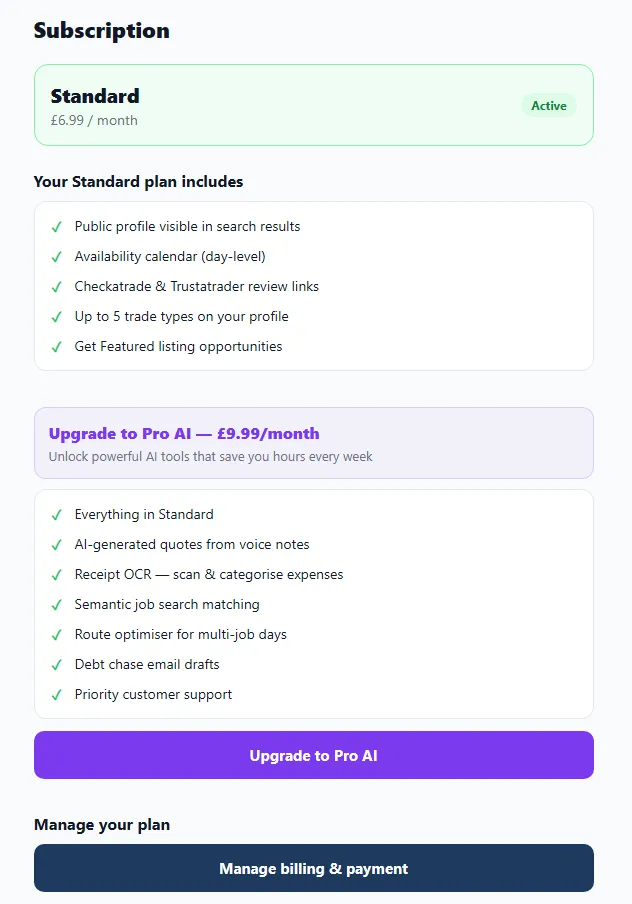
What you’ll find here
Section titled “What you’ll find here”- Your current plan — Standard or Pro AI.
- Your price and renewal details.
- Options to upgrade, downgrade or add the Featured add-on.
- How the subscription was purchased (app store or card).
Changing plans
Section titled “Changing plans”You can switch between Standard and Pro AI at any time — there’s no long contract.
- Upgrading to Pro AI unlocks the AI tools (Voice-to-Quote, receipt OCR, debt chasing and more) right away. See Choosing a plan for what’s included.
- Downgrading to Standard keeps your profile, calendar, quotes and invoices — you simply lose access to the Pro-only tools.
The Featured add-on
Section titled “The Featured add-on”Want to stand out in a particular area? Add Get Featured for a specific postcode district. It’s billed separately from your plan and you can add or remove it whenever you like.
Billing and payments
Section titled “Billing and payments”Depending on your device, your subscription is billed either through the app store (Apple / Google) or by card. The Subscription screen shows which applies to you and where to manage payment details.
Cancelling
Section titled “Cancelling”You can cancel any time. Your profile stays live until the end of the period you’ve paid for, after which it stops appearing in customer searches. Your data isn’t deleted — if you come back, it’s waiting for you.