
Settings
The Settings screen is where you tailor BizzyDay to how you work — your preferences and account in one place.
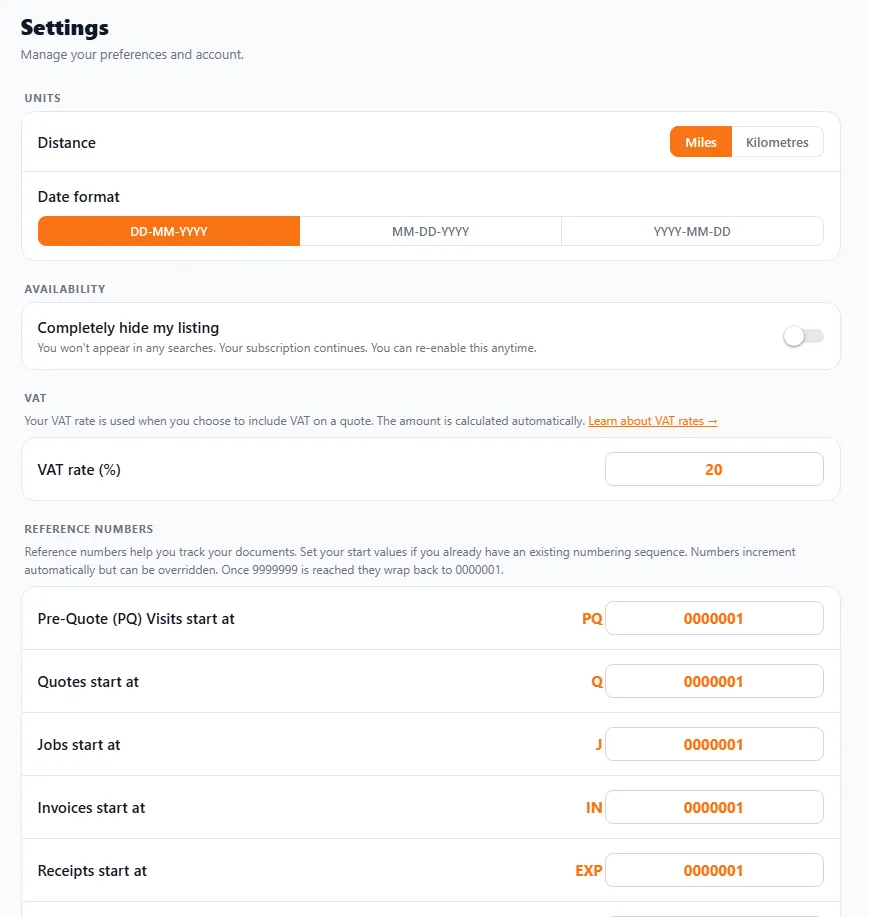
- Distance — choose Miles or Kilometres for travel distance and your mileage log. (Most UK tradespeople use miles.)
- Date format — choose how dates appear across the app and on your documents: DD-MM-YYYY (the UK standard), MM-DD-YYYY, or YYYY-MM-DD.
Availability
Section titled “Availability”- Completely hide my listing — turn this on and you won’t appear in any searches at all. Your subscription carries on and you can switch it back on anytime. Handy if you’re fully booked for a while and don’t want new enquiries.
Set your VAT rate (%) here. It’s used whenever you choose to include VAT on a quote or invoice, and the amount is worked out automatically. If you’re not VAT registered, simply don’t add VAT to your documents — see Creating an invoice.
Reference numbers
Section titled “Reference numbers”Every document you create gets a reference number so you (and HMRC) can track it. Settings lets you set the starting number for each type — which matters if you’re moving to BizzyDay and want to continue an existing numbering sequence.
Each document type has its own prefix:
| Document | Prefix |
|---|---|
| Pre-Quote visits | PQ |
| Quotes | Q |
| Jobs | J |
| Invoices | IN |
| Receipts / expenses | EXP |
Numbers increment automatically as you create documents, but you can override any individual one. (They run up to 9999999, then wrap back to 0000001.)