
Sync Google & Apple calendars
If you already keep a calendar elsewhere — Google Calendar, Apple Calendar, Outlook — you don’t want to enter everything twice. BizzyDay connects to your other calendars so your availability stays in step.
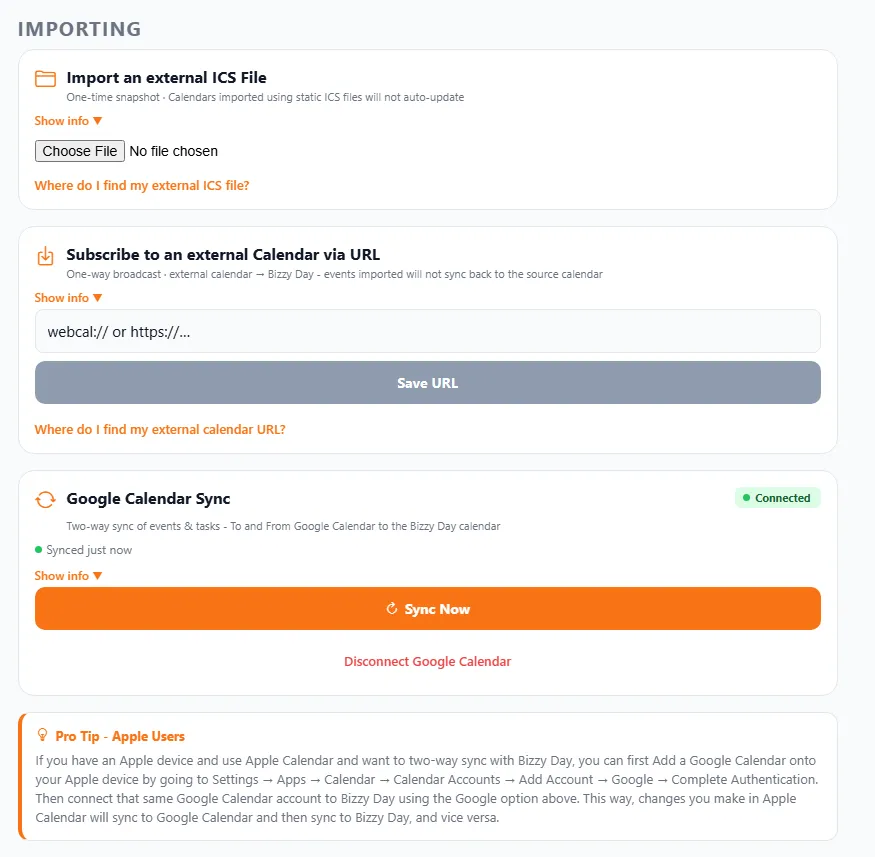
Three ways to connect
Section titled “Three ways to connect”BizzyDay gives you three options, depending on how up-to-date you need things to stay.
1. Import an external ICS file
Section titled “1. Import an external ICS file”A one-time snapshot. Choose an .ics file exported from another calendar and its events come in once.
- ✅ Quick way to pull in a fixed set of events.
- ⚠️ It won’t auto-update — if the original calendar changes, you’d need to import again.
2. Subscribe to an external calendar via URL
Section titled “2. Subscribe to an external calendar via URL”A one-way broadcast from your other calendar into BizzyDay. Paste a webcal:// or https:// calendar link and BizzyDay keeps pulling in its events.
- ✅ Stays updated as the source calendar changes.
- ⚠️ It’s one-way — events flow in to BizzyDay; changes you make in BizzyDay won’t sync back to the source.
3. Google Calendar Sync
Section titled “3. Google Calendar Sync”A full two-way sync of events and tasks, to and from Google Calendar. Connect your Google account and the two calendars keep each other up to date, so a job you add in BizzyDay appears in Google, and an appointment in Google blocks out time in BizzyDay.
- ✅ The most seamless option — book once, see it in both places.
- Use Sync Now to refresh on demand, and Disconnect to stop syncing.
Apple Calendar users
Section titled “Apple Calendar users”There’s no direct Apple Calendar connection, but you can still get two-way sync by routing through Google:
- On your Apple device, add your Google account to Apple Calendar (Settings → Apps → Calendar → Calendar Accounts → Add Account → Google).
- Connect that same Google account to BizzyDay using Google Calendar Sync above.
Now changes in Apple Calendar sync to Google, and Google syncs with BizzyDay — and back again.
Why sync?
Section titled “Why sync?”- No double-entry. Book something once, see it everywhere.
- No clashes. A personal appointment in your other calendar won’t get double-booked with a job.
- One source of truth. Your availability reflects your whole life, not just what you typed into BizzyDay.