
Holidays & non-working days
Being available on BizzyDay only helps if it’s accurate. Marking your holidays and regular days off keeps customers from requesting dates you can’t do — and keeps your calendar honest.
Holidays vs non-working days
Section titled “Holidays vs non-working days”- Holiday — a one-off period you’re away (annual leave, a long weekend, time off).
- Non-working day — days you routinely don’t work, like weekends or a set day each week.
Both show clearly on your public profile so customers understand when not to expect you.
Booking a holiday
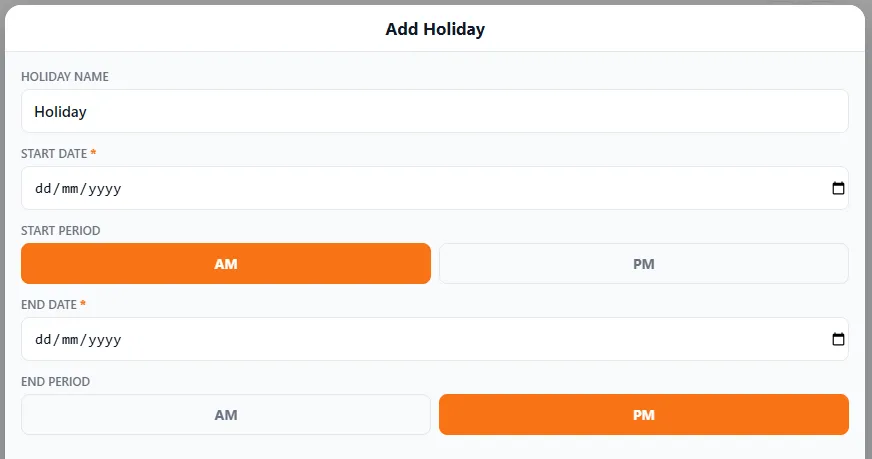
Section titled “Booking a holiday”- Open Calendar and add a holiday (the + button).
- Give it a name (e.g. “Summer break”).
- Set the start date and whether it begins in the AM or PM.
- Set the end date and whether it ends in the AM or PM.
- Save — those days now show as unavailable to customers.
Because the start and end each have an AM/PM period, you can take a precise slice of time off — like heading away from Friday afternoon and being back Monday morning — without blocking whole days you could still work.
Setting your regular days off
Section titled “Setting your regular days off”Set the days you never work (for most, that’s the weekend) as non-working days. Do it once and they’ll consistently show as unavailable, so you’re not fielding requests for a Sunday you’d never take.
Why it’s worth the two minutes
Section titled “Why it’s worth the two minutes”- Fewer awkward conversations turning down dates you were never free for.
- A profile customers trust — what they see is what they get.
- A calendar that reflects your real life, not just your work.