
Expenses & receipts
Every receipt you keep is money off your tax bill — but only if you actually record them. BizzyDay makes capturing expenses quick, so your costs (and your real profit) are always accurate.
Why track expenses
Section titled “Why track expenses”- Lower your tax bill. Legitimate business costs reduce your taxable profit.
- Know your real margins. A job’s true profit is the price minus what it cost you.
- Be ready for HMRC. Keeping records of your expenses is part of running a business properly.
Capturing a receipt
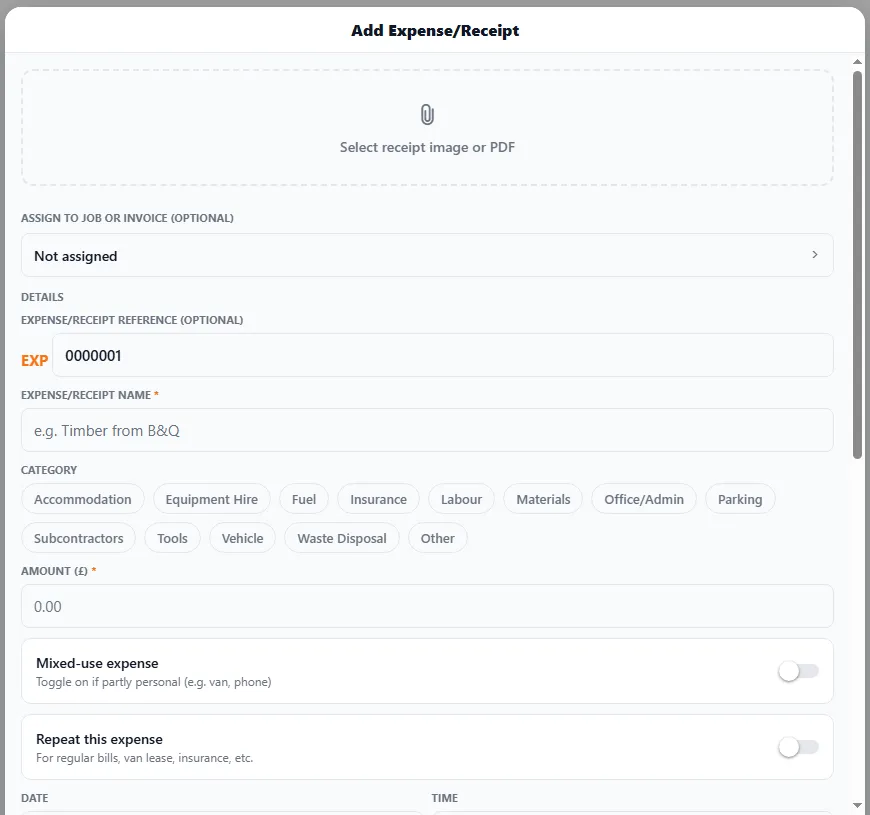
Section titled “Capturing a receipt”- Open Expenses & Receipts and add a new one.
- Attach the receipt — a photo or a PDF (or just enter the details manually).
- Give it a name (e.g. “Timber from B&Q”) and pick a category — Fuel, Materials, Tools, Insurance, Vehicle, Subcontractors, Parking, Waste Disposal and more.
- Enter the amount, and optionally assign it to a job or invoice.
- Save — it’s stored and counted against your finances.
Receipts are stored as tidy images (or PDFs) so you’re not hoarding curling bits of paper in the van.
Mixed-use and repeating expenses
Section titled “Mixed-use and repeating expenses”Two toggles handle the awkward cases:
- Mixed-use expense — for things that are only partly business, like your van or phone. Flag it so it’s treated correctly.
- Repeat this expense — for regular costs like van lease, insurance or subscriptions, so you don’t re-enter them every time.
AI receipt scanning (OCR)
Section titled “AI receipt scanning (OCR)”On Pro AI, you don’t type the numbers — snap the receipt and AI reads it for you, pulling out the amount, supplier and date. Just check it’s right and save. It turns a fiddly job into a two-second one, so receipts actually get logged instead of piling up.
Assigning costs to jobs
Section titled “Assigning costs to jobs”Link a receipt to the job it was for, and BizzyDay can show you what that job really cost — and therefore what you really made on it. Great for learning which kinds of work are worth your time.